> For AI agents: the complete documentation index is available at /llms.txt, the full documentation bundle is available at /llms-full.txt.
# Resolver analysis
:::tip
Resolver analysis is supported for Rspack, but it is disabled by default. To enable it, add `resolver` to the `features` array as shown in the example below. See [features configuration](/config/options/options.md).
```js
new RsdoctorRspackPlugin({
features: [
'resolver',
// ...other features
],
});
```
:::
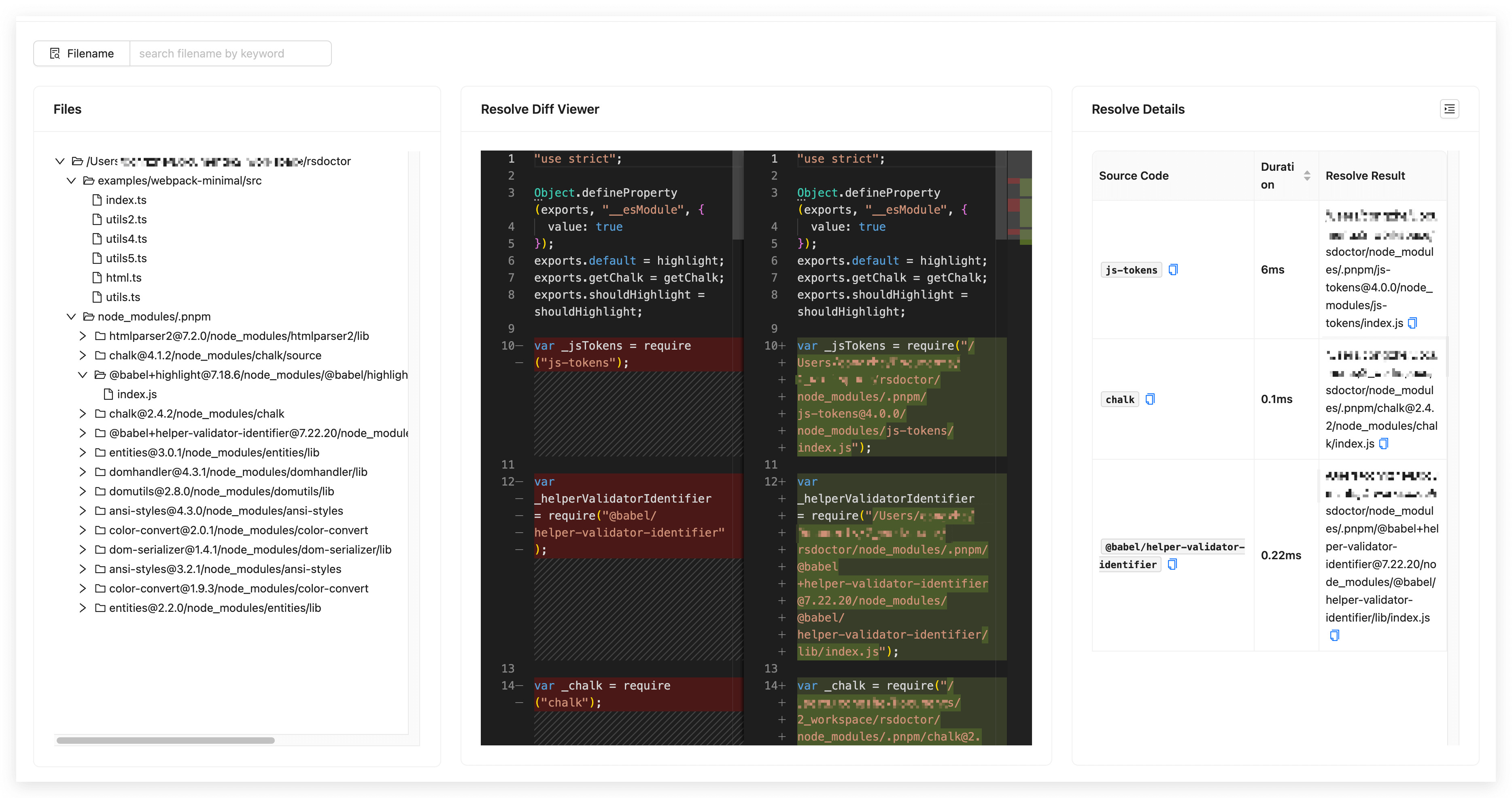
In the **Rsdoctor** `Module Resolve` section, we can see all the source files in the current Rspack project. By **clicking on a file**, we can view information such as the **module paths** imported in that file, the **before and after resolution path comparison**, and the **resolution time**, as shown in the following image:
## Glossary
The fields in the data statistics table on the page are defined as follows:
| Term | Description |
| ---------------------------- | --------------------------------------------------------------- |
| Source Code | Represents the **source code** of the import statement |
| Duration | Represents the **time taken** for resolution |
| Resolve Result | Represents the **final path** after resolving the `Source Code` |